Categories
Linux Open Source

KNemo – Monitor your Internet usage…

KNemo is a Network monitoring program for Linux. The program stores information wrt the amount of data communicated thru your various LAN connections and also provides a way to automatically disable the internet on certain conditions.

KNemo is a simple addon program to your network management enabling you to control your internet usage. It also provides methods to disable internet in case you exceed the monthly bandwidth limit of your plan. Its an excellent tool to study your usage of internet over time.

To install Knemo on a ubuntu system, use the following command:
sudo apt-get install knemo

Enhanced by Zemanta
Categories
Linux Solutions

Deleting those Pesky Hard to Delete files…

Sometimes we find a file in our filesystem with a weird non realistic name, which was probably created by mistake. There can be hundreds of reasons why this file got created but due to its unique uncharacteristic name its almost impossible to delete the file in the usual way(right click delete or rm on command line)

Eg,. a file with the name “??@@???@8” got created on my home drive and I cannot delete, move or rename the file.

To delete such a file we need to delete it using its inode number as the reference. You can get the inode number of the file by executing the following command in the directory containing the file

ls -il

Output:
1130895 -rw-r--r-- 1 tech tech 0 2010-07-02 15:49 ??@@???@8
1131122 drwxr-xr-x 4 tech tech 4096 2010-03-12 22:54 Bills
286834 drwxr-xr-x 5 tech tech 4096 2010-05-06 12:26 Blog
1131109 drwxr-xr-x 2 tech tech 4096 2010-05-06 12:24 Books
1139338 drwxr-xr-x 3 tech tech 4096 2010-05-06 12:26 Friends
1156511 drwxr-xr-x 3 tech tech 4096 2010-07-31 11:02 Photos

As you can see the console does not recognize the name of the file correctly, this is exactly the reason why it was failing to delete the file. The first number in the line is the inode number. To delete the file we will use the following command:
find . -inum <inode-number> -exec rm -i {} \;

Output:
tech@chandrahasa.com:~/Documents$ find . -inum 1130895 -exec rm -i {} \;
rm: remove regular empty file `./\001\223@@\360\006\v@8'? y
tech@chandrahasa.com:~/Documents$

Enhanced by Zemanta
Categories
Linux Media Open Source

Managing Collections with Tellico

Tellico
Image by *Luana* via Flickr

Tellico is a versatile collection manager for Linux. The KDE based application is designed to handle almost any type of perceivable collection and convert it to a easily manageable solution. If you have a huge collection of movies, music, books, comics ect and regularly lend them out, Tellico is the perfect program to keep track of your collections.

Tellico has pre-designed support for collections of: Books, Comics, Movies, Music, Coins, Stamps, Board Games, Wines. Cards and Games. The databases are designed to make data entry and search both relevant and easy.

Categories
Open Source Web

Threaded Comments in WordPress

WordPress
Image via Wikipedia

WordPress has a builtin feature of allowing threaded comments for your posts. This feature is by default disabled and has to be “enabled”… Here is how to do that:

  • Login to your WordPress install as Admin(or a user with Admin permissions).
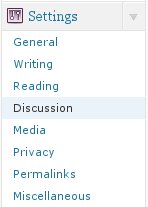
  • Navigate to the “Settings” menu and the “Discussions” option in that menu.
  • Under “Other Comment Settings” section, you will find the option: Enable threaded (nested) comments.
  • Check the option and provide the maximum depth of a thread.

Now nested comments should be enabled on your WordPress Blog.

Enhanced by Zemanta
Categories
Web

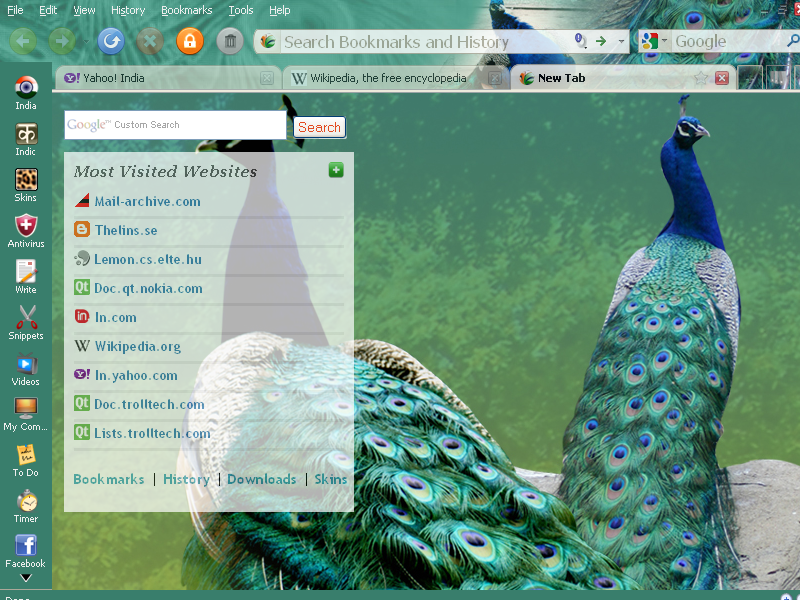
Epic Browser – Review


Epic Browser tagged as the new browser for India and claimed as the first browser with a built in anti-virus, was launched recently.  The browser boasts of its own collection of Apps and is clearly inclined towards the Indian users.  But what does it do that its predecessors couldnt…  Here is our take on Epic.