Categories
Linux Open Source Solutions

Fixing Open Office Issue – User Installation could not be completed

Encountered this issue while trying to run Open Office from a newly installed Ubuntu box:

This application could not be started.
User installation could not be completed.

To fix this issue you need to basically reset the config of LibreOffice. This can be done using the following command (Warning: This deletes all your settings and config wrt LibreOffice):

rm -rf ~/.config/libreoffice

Note: This issue can also occur when the permissions of the config folder is incorrect (root instead of user), use this command to fix that issue:

chown haas -r ~/.config/libreoffice

Categories
Android Device Hardware Nexus 5 Open Source Solutions

How To Disable Keyboard Touch Vibration in Android 6 Marsh Mallow (Nexus 5x & 6p)

Google Keyboard is the default keyboard in the Android 6(Marsh Mallow). By default, its configured to enable vibration on key press. If you are someone who dislikes this feature and wants to disable it, here is a simple way of disabling it:
{adinserter 3}

  • Go to Home -> Settings -> Language & input
  • Locate “Google Keyboard” and press it to open its options.
  • Select Preferences
  • Disable the “Vibrate on keypress” option and you are good
Categories
JavaScript jQuery Solutions Web

JavaScript Loop Through Select Options – Example

Sometimes we need to iterate through all the options of a DropDown list (and perform operations based on each one). Here is how to do it(for a dropdown with the id “dropdownlist”)

JavaScript:

var x= document.getElementById("dropdownlist");
for(i=0; i<x.options.length;i++){
console.log(x.options[i].value);
//Add operations here
}

JQuery:

$("#dropdownlist > option").each(function() {
console.log(this.text + ' ' + this.value);
//Add operations here
});

Categories
Android Apps FaceBook Solutions Web

How to Disable Facebook Links from opening in the Facebook App Browser

Facebook logo Español: Logotipo de Facebook Fr...Facebook recently update added a new feature to its mobile app. The feature loads all links clicked on Facebook to open in the in-app browser as opposed to a browser installed on the phone. While this is faster, it seriously limits what you can do with the open page (for eg. sharing is limited). But fortunately this feature can be disabled.

To disable it, do the following:

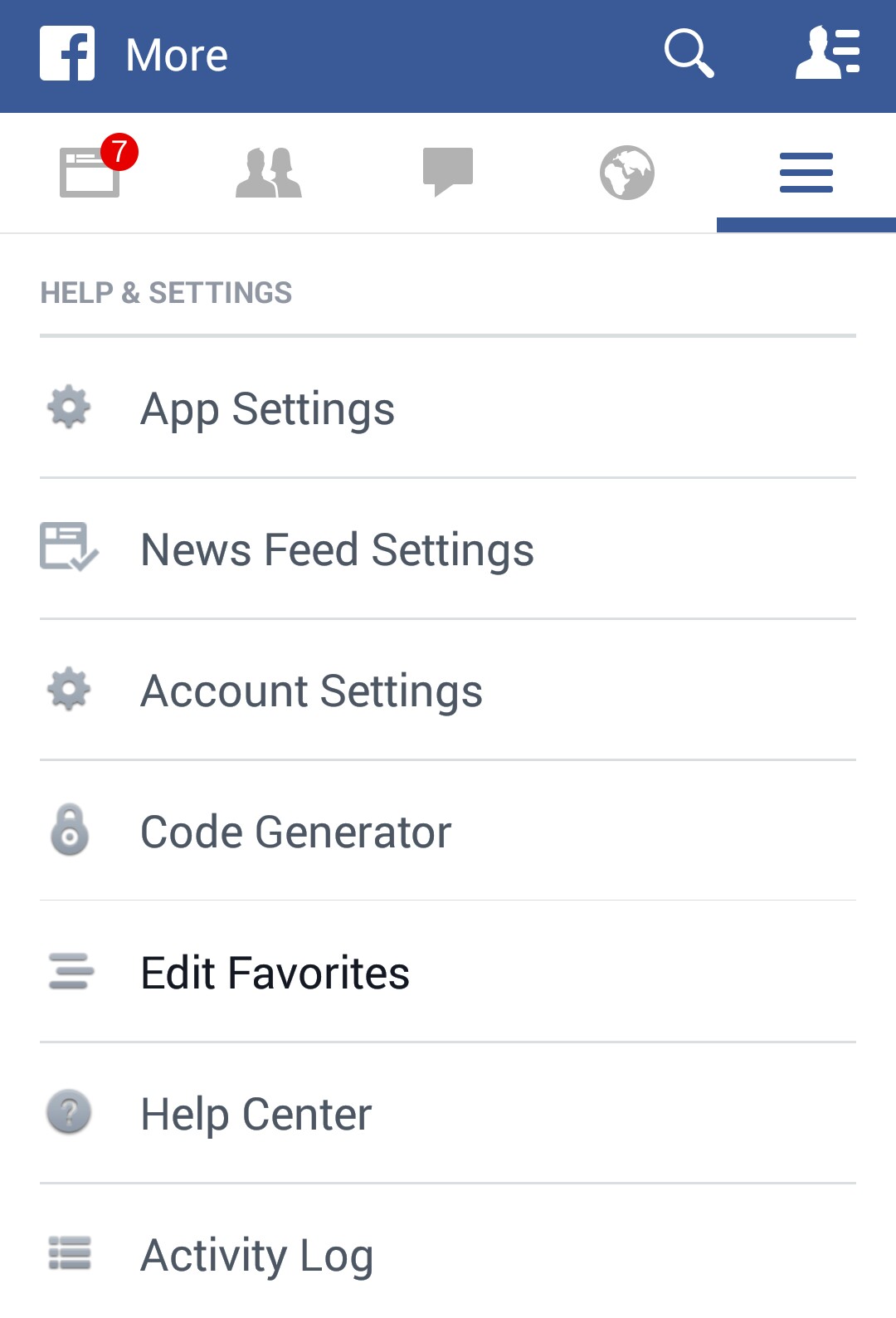
  1. In the Facebook app, goto Menu > App Settings
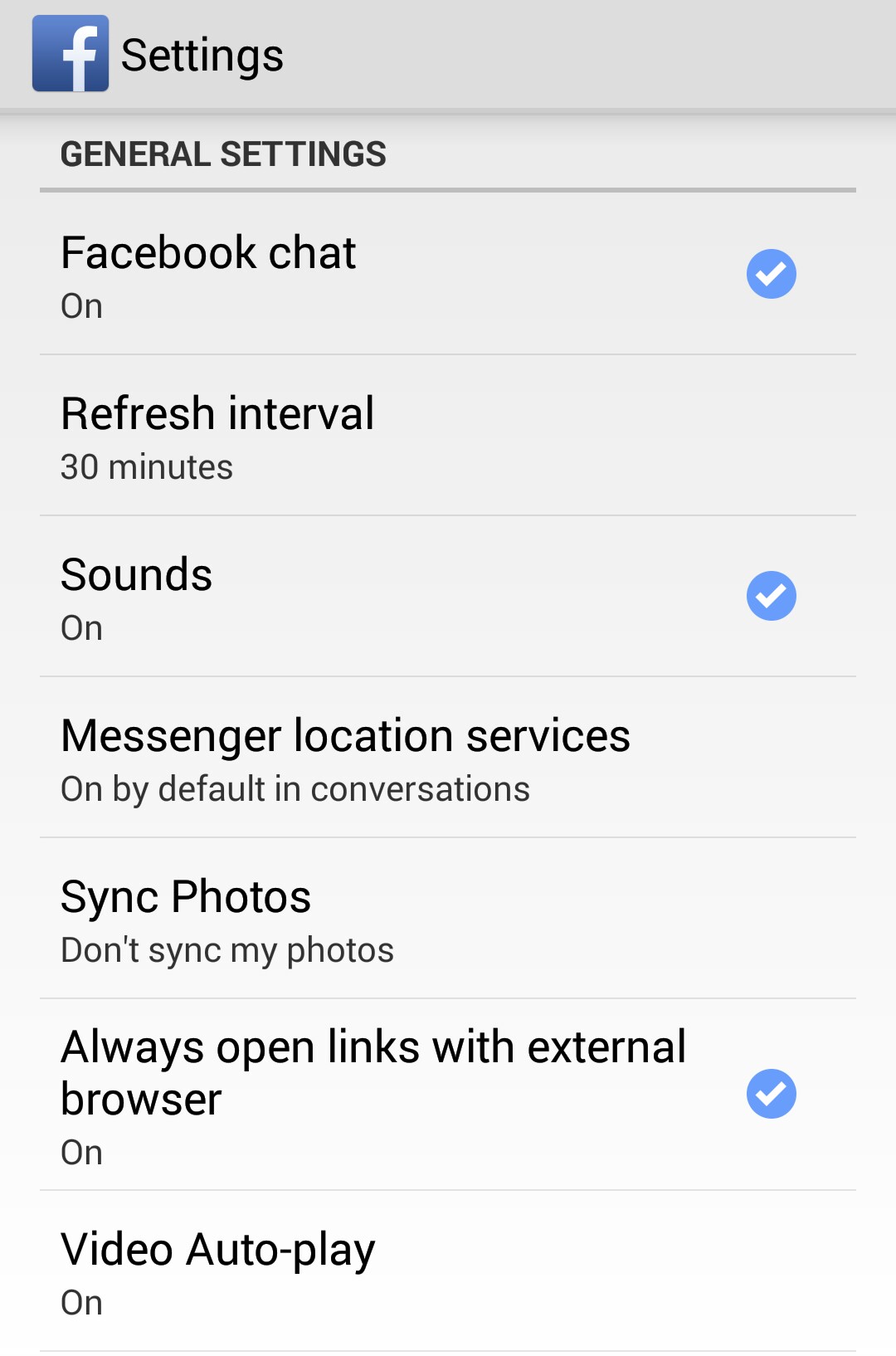
  2. In General Settings, you will find the “Always open links with external browser” option. Tap it to Enable it.
  3. Now your facebook app should behave just the way it did before the update.

Screenshots:
_20141117_204056 _20141117_204038

Categories
Internet Explorer Solutions Web

How to force Internet Explorer to view a page in a specific version mode.

Internet Explorer 7
Internet Explorer 7 (Photo credit: Wikipedia)

Meta tags can be used to force Internet Explorer(IE) browser to use a specific standards mode. The X-UA-Compatible meta tag tells IE what view mode to use to render the current page.

Here is how to emulate different browser modes using meta tags:

Emulate IE 7:

<meta http-equiv="X-UA-Compatible" content="IE=7">

Emulate IE 8:

<meta http-equiv="X-UA-Compatible" content="IE=8">

Emulate IE 9:

<meta http-equiv="X-UA-Compatible" content="IE=9">

If the end client visits the page on a browser that is older than the specifed view mode (eg. User has IE 8 but view mode forces IE 9), the browser will ignore the meta tag and render the page the best way it can.