Categories
Open Source Solutions Web

Best DNS, Got Even Better…

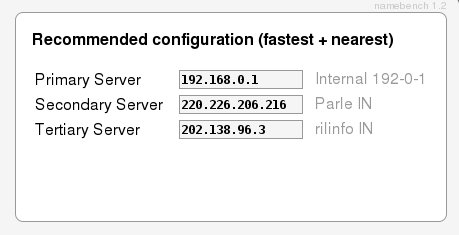
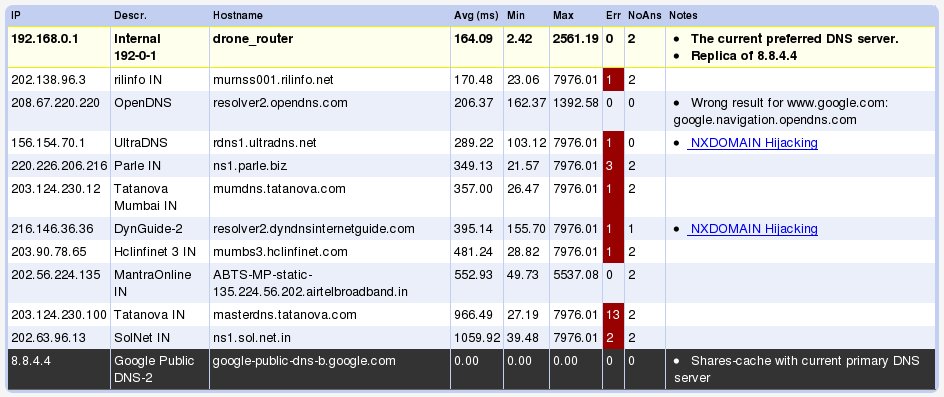
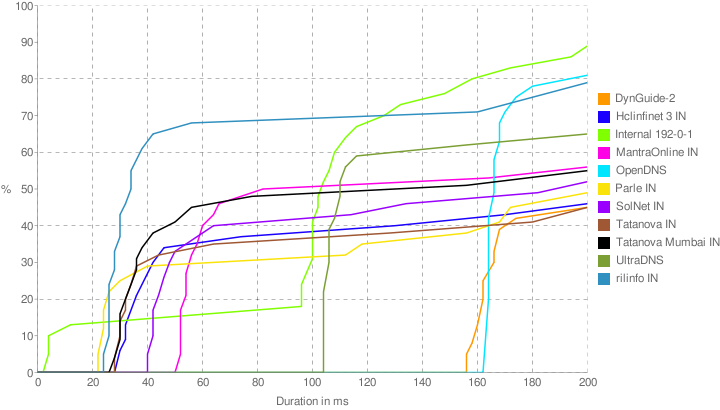
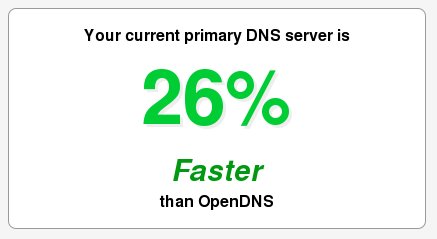
A while back on this site we had mentioned about a DNS benchmarking tool called Namebench.   The Google Code project has been having some major updates since then and now lookes more jazzier and generates some lovely graphs after analysing your connection for you.

The tool can be downloaded here: http://code.google.com/p/namebench/

Screenshots:

Reblog this post [with Zemanta]
Categories
Solutions Ubuntu Web

Getting Multimedia Working on Ubuntu

Ubuntu wordmark official
Image via Wikipedia

If you are a newbie Ubuntu user then in all probability you have struggled to get the system setup to listen to your favorite music, watch your favorite movies and browse your favorite sites(video and flash).

Is there a quick simple way to fix these problems in one go? Yes there is 🙂

All you need to do is to install the Restricted Extras package for your distro and you are set to go.

For (K/X)Ubuntu 9.04 (Jaunty Jackalope) and 9.10 (Karmic Koala)

Based on your derivative of Ubuntu, install one of these packages:

(K/X)Ubuntu 9.04, 8.10, 8.04

  • Go to your system’s Application installer
  • Search for the package ubuntu-restricted-extras(Ubuntu), xubuntu-restricted-extras (Xubuntu) and kubuntu-restricted-extras (Kubuntu) and install it.

Or Alternatively open the Terminal, and execute the following command:

sudo apt-get install ubuntu-restricted-extras
Reblog this post [with Zemanta]
Categories
Web

The Best DNS for you

Having a quick Domain Name Server is very important for that lightning quick internet experience. Fortunately there are ways for you to easily figure out which DNS works best for you.

Namebench as described at its website:

It hunts down the fastest DNS servers available for your computer to use. namebench runs a fair and thorough benchmark using your web browser history, tcpdump output, or standardized datasets in order to provide an individualized recommendation. namebench is completely free and does not modify your system in any way.

All you need to do is download the program and run it. After a few minutes of churning out calculations the program will tell you the best DNS settings for your system.

Reblog this post [with Zemanta]
Categories
Web

µTorrent in Windows 7 & Other Links

Fix For uTorrent In Windows 7There are reports in various forums that uTorrent exceeds memory limit and shoots up to 100% in other cases some downloads will stop at 99.9%. In few cases uTorrent shows false reports and works oddly. – Here is how to fix those nagging problems.

The Master List of New Windows 7 Shortcuts – Lifehacker’s list of useful Windows 7 shortcuts.

How to Bring Back the Old Facebook Feed – Irritated with the new facebook feed separation? Here is how to get back to the old ways.

Reblog this post [with Zemanta]

Categories
Solutions Web

AdBlock for Opera 10

If you are like me and totally obsessed with Opera 10, but still a new user to the browser, then you might be wondering how to do a few things on it. One of my biggest problems was to get an Ad Block system up and running in the browser. A little web search gave me the way to do it.

Here are my notes:

  • Opera requires you to save a java script file that does the adblocking for it.  I found one here
  • Save the file into a folder of your choice.  I suggest creating a new folder as you will need to specify the folder not the file in future steps
  • Open Opera and hit “Alt – P”
  • In the corresponding dialog, click on the advanced tab
  • Click on “JavaScript Options…”
  • Hit “Choose” and navigate to the folder where you stored the file and hit “Ok”
  • You might need to refresh the pages for the adblock to take effect.
Reblog this post [with Zemanta]