Categories
Apps Solutions Web

In Line Dictionary for Firefox

Google Dictionary and Google Translate Extension for Firefox provides a simple solution for in-line translation/dictionary look-up of words & translation of whole pages.

Once installed all you need to do is double-click or highlight a word, and a little pop-up will show the definition of it in your language.
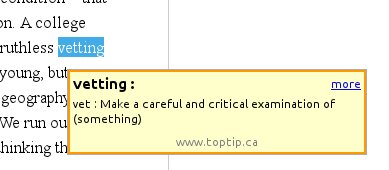


Click on the link below to install the plugin:
Google Dictionary and Google Translate 2.5


Categories
Open Source Solutions

Restoring Lost Session in Firefox


Image representing Firefox as depicted in Crun...
Image via CrunchBase

After a crash Firefox, when restarted gives a page with the option of Restoring the session or Starting a new session. Sometimes in haste we might hit the “New Session” option and feel a bit stupid that all those open tabs are now gone…

Well there is a simple way to undo that. Simply point your browser to “about:sessionrestore” and you will get back to the page with the option of restoring your previous session again!


Categories
Open Source Solutions Web

Firefox: Spell Check Single Line Fields

Mozilla Firefox word mark. Guestimated clear s...
Image via Wikipedia

Firefox by default spell checks text fields, it has the built in ability to spell check single line fields(search bars ect) but that is disabled by default.

To activate the ability of firefox to spell check single line fields, do the following:

  • Bring up your about:config page. You can do this by typing “about:config” in your address bar and clicking on “I’ll be careful, I promise” button
  • In the “Filter” field type layout.spellcheckDefault.
  • As you can see, the integer value is 1. Double-click on it, then enter 2 as its new value.
  • Click OK.
Reblog this post [with Zemanta]
Categories
Open Source Solutions Ubuntu

Upgrading to the Latest Firefox – Ubuntu Hacks

The generic globe logo used when Firefox is co...
Image via Wikipedia

Heard a lot of wonderful reviews of the latest firefox? Want to try it out on your Ubuntu box?
Well unfortunately Ubuntu does not update its Firefox packages immediately after the release. To give a good test run for the latest and best you need to add the repository for the latest release of firefox. The steps are explained below: