Categories
Android Apps Solutions

How to disable/customize audio notificaitons for email in Android

Image representing Gmail as depicted in CrunchBase
Image via CrunchBase

I receive a lot of emails and while I like to be on top of my inbox most of the time, I occasionally don’t want an audio notification for every mail I receive. So here is a simple step by step process of disabling/customizing audio notification for the Gmail app in Android.

  • Click on your Gmail icon.
  • Go to “Menu” > “More” > “Settings”
  • Select the email address you’d like to change the setting for (eg yourname@gmail.com)
  • Scroll down and Select “Lables to Notify”
  • Hit the dropdown arrow next to “Inbox”
  • Select “Ringtone” and then select “Silent”(for disabling audio notifications) or your desired ringtone
Categories
Solutions Web

How to check if a Website is actually down?

There are many reasons why a website might not open in your browser. They include:

  • The website being down
  • Your DNS not being able to lookup the IP address of the website
  • Settings in your browser blocking access to the website
  • Routers/Proxy servers redirecting traffic

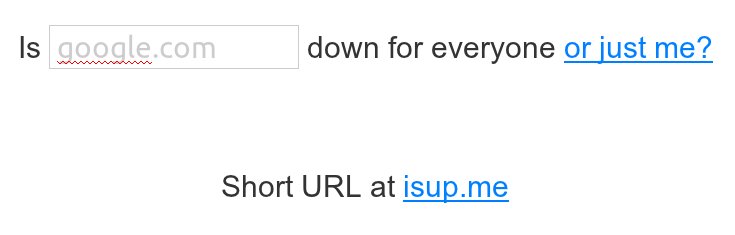
The possiblity of error might seem to be larger on your side but its deeply frustrating to check every cause and eventually figure out that the problem was actually on the website’s side.  The simplest way to eliminate this possibility is to check the website through http://www.downforeveryoneorjustme.com/

Fire up your browser and point it to http://www.downforeveryoneorjustme.com/

Once there type the website to check, in the space provided and hit enter.

If the website is down you will get something like the following message:

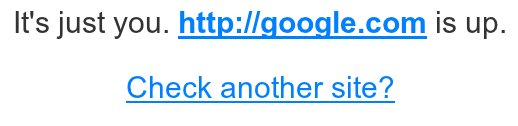
Other wise you will get a message like this one:

In case of the latter, maybe its time to choose a better DNS provider or recheck your browser/router settings

Categories
Apps Solutions Web

In Line Dictionary for Firefox

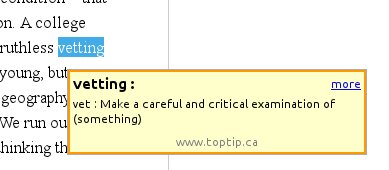
Google Dictionary and Google Translate Extension for Firefox provides a simple solution for in-line translation/dictionary look-up of words & translation of whole pages.

Once installed all you need to do is double-click or highlight a word, and a little pop-up will show the definition of it in your language.


Click on the link below to install the plugin:
Google Dictionary and Google Translate 2.5


Categories
Open Source Solutions

Restoring Lost Session in Firefox


Image representing Firefox as depicted in Crun...
Image via CrunchBase

After a crash Firefox, when restarted gives a page with the option of Restoring the session or Starting a new session. Sometimes in haste we might hit the “New Session” option and feel a bit stupid that all those open tabs are now gone…

Well there is a simple way to undo that. Simply point your browser to “about:sessionrestore” and you will get back to the page with the option of restoring your previous session again!


Categories
Android Hardware Solutions

Galaxy Ace – Gingerbread Update – Notes

Image representing Android as depicted in Crun...
Image via CrunchBase

There are many good tutorials on the web about installing Gingerbread on the Ace (like this one).

Once you have Gingerbread installed what can you expect from your new system?
Other than the already present updates to Android, here are a few notes I made:

  • The Default language at the start is not English. To change, go to Settings -> Locale and Text (recognizable by the keyboard key A as the logo) -> Select Language (Option no. 1 in the list) -> English (or any other language)
  • The battery lasts longer and is estimated more accurately. – The battery info is more detailed too.
  • The Wifi bug that caused the “black screen of death” problem is fixed. Expect more stability while using Wifi
  • The UI is faster and more responsive
  • Fonts are crispier and look great
  • The notification bar is smaller and that really helps screen real estate.
  • Internal memory usage has improved leaps and bounds, expect lesser problems in that area

All in all the upgrade to Gingerbread has been perfect so far.

Note: The version I have installed is XXKPH