UPDATE: For Android 6 (Marsh Mallow) use these steps

{adinserter 3}
- Go to Home -> Settings -> Language and Keyboard
- Locate “Google Keyboard” and press the settings button next to it.
- Uncheck the tick next to “Vibrate on keypress”
UPDATE: For Android 6 (Marsh Mallow) use these steps
{adinserter 3}

Note: The solutions explained below can damage or brick your phone. Please exercise caution when implementing them. The author has tried most of these solutions but under expert supervision. If you are not sure about the solution please contact your Google Support
There seems to be a common problem in some Nexus 5 phones wherein the phone switches off and just refuses to start up. This happened to a colleague of mine too and here are my observations and possible solutions to the problem:

Problem loading Widget Error – Sometimes Widgets on the Android home page fail to load and are replaced by “Problem Loading Widget” error. The main causes of this error include:
There is no simple way to fix this error, as it can depend on what caused the error in the first place and how the Widget was originally designed. Here are some quick steps you can follow to recover your widget:
Google Dictionary and Google Translate Extension for Firefox provides a simple solution for in-line translation/dictionary look-up of words & translation of whole pages.
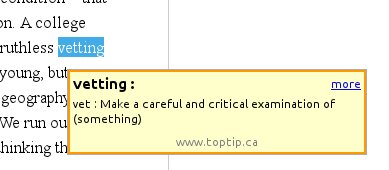
Once installed all you need to do is double-click or highlight a word, and a little pop-up will show the definition of it in your language.
Click on the link below to install the plugin:
Google Dictionary and Google Translate 2.5


The “Could Not Install On USB Storage Or SD Card” error on Android phones apparently occurs when something goes wrong with the installation of an app and temp file is left on your Android OS. There is a work around and a fix for this problem.
The Work Around:
The Fix:
Note: I suggest you backup your sd card before you try this method. It worked perfectly on my Galaxy Ace but there is no guarantee that it might not cause any data loss.
Hope this helps you 🙂