Categories
Linux Solutions

Compressing files in Linux & Unix – Cheat Sheet

Here is a quick cheat-sheet on How To Compress files in Linux & Unix

Zip
zip archive file1 file2 file3
Compresses file1 file2 file3 into an achive with filename archive.zip

zip archive *
Compresses all files in the current directory into an achive with filename archive.zip

zip -r archive dir
Compresses the directory dir(and its subdirectories) into an achive with filename archive.zip

unzip archive.zip
Uncompresses the archive archive.zip to the current directory

unzip archive.zip -d dir
Uncompresses the archive archive.zip to the directory dir

Categories
Device Hardware Laptop Linux Solutions Ubuntu

Getting the Latest Ubuntu Graphics Drivers on Samsung NC20

Official Ubuntu circle with wordmark. Replace ...
Image via Wikipedia

To get the best graphics performance out of your Samsung NC20, you will need to install the latest graphics drivers.  These drivers unfortunatey are not easy to find on the web, so here is a step-by-step installation instructions for driver installation on Ubuntu 10.10.  Special thanks to the wonderful folks at Ubuntu Forums(Wonderful source, thumbs up to the contributors).
{adinserter 2}
The steps explained below were taken from post #542 from this Ubuntu Forums page.

  1. Download this zip file via_chrome9_drv_u1010_v2.zip and unzip it
  2. Open a terminal window and change into that directory (“cd ~” for home dir)
  3. Install the “dkms” package from Ubuntu package repository
    $ sudo apt-get install dkms
  4. Install the kernel driver:
    $ sudo dpkg -i chrome9-drm_87a.55689-maverick1_all.deb
  5. Install the X.org driver:
    $ sudo dpkg -i --force-confmiss --force-confnew xserver-xorg-video-chrome9_87a.55729-maverick1_i386.deb
  6. Update /etc/X11/xorg.conf file
  7. Copy the provided xorg.conf.nc20 file to xorg.conf
    $ sudo mv /etc/X11/xorg.conf /etc/X11/xorg.conf.backup
    $ sudo cp /etc/X11/xorg.conf.nc20 /etc/X11/xorg.conf
  8. Reboot Ubuntu
  9. Check if it’s working: Open /var/log/Xorg.0.log in a text editor. If you see several lines containing “VIA(0)”, then the new driver is being used.

Also note:

  • The sample xorg.conf.nc20 is only installed if you add the “–force-confmiss –force-confnew” options to dpkg.
  • Although VIA marks the source code this hacked driver is based on as stable, I cannot guarantee it to be bug-free. Use with caution.
Enhanced by Zemanta
Categories
Linux

Determine Mounted Filesystem Types on Linux


In linux its very easy to lose track of filesytem types if you have been using it for a while. With the advent of ext4(and NTFS) systems its hard to guess which filesystem type is running on each partition.

One of the easiest ways to determine the filesystem type of a mounted filesystem is to use the mount command. The output of the command is of the type:

haas@techhacks:~$ mount
/dev/sdb8 on / type ext4 (rw,errors=remount-ro,commit=0)
proc on /proc type proc (rw,noexec,nosuid,nodev)
none on /sys type sysfs (rw,noexec,nosuid,nodev)
fusectl on /sys/fs/fuse/connections type fusectl (rw)
none on /sys/kernel/debug type debugfs (rw)
none on /sys/kernel/security type securityfs (rw)
none on /dev type devtmpfs (rw,mode=0755)
none on /dev/pts type devpts (rw,noexec,nosuid,gid=5,mode=0620)
none on /dev/shm type tmpfs (rw,nosuid,nodev)
none on /var/run type tmpfs (rw,nosuid,mode=0755)
none on /var/lock type tmpfs (rw,noexec,nosuid,nodev)
/dev/sdb6 on /media/Windows type fuseblk (rw,nosuid,nodev,allow_other,blksize=4096,default_permissions)
/dev/sdb9 on /home type ext4 (rw,commit=0)
binfmt_misc on /proc/sys/fs/binfmt_misc type binfmt_misc (rw,noexec,nosuid,nodev)
/dev/sda1 on /media/ext type ext4 (rw,nosuid,nodev,uhelper=hal)


As you can see, second last column displays the file system type. For example first line [/dev/sdb8 on / type ext4 (rw,errors=remount-ro,commit=0)] can be read as follows:

  • /dev/sdb8 : Partition
  • / : File system
  • ext4 : File system type
  • (rw,errors=remount-ro,commit=0) : Mount options
Enhanced by Zemanta


Categories
Linux Solutions Ubuntu

Solve Choqok’s Twitter Connectivity Problems…

This file is created by Roozbeh Shafiee for Ch...
Image via Wikipedia

Choqok the new and impressive micro-blogging client for KDE is one of the best clients for microblogging sites. The tool available via the default repositories of Ubuntu does not support the latest OAuth authentication of Twiiter. This means that it wont be able to connect to twitter.

You will need the latest version of Choqok to be able to reconnect to twitter. This can be done as shown below

  • Open the Konsole and execute the following commands:
  • $ sudo add-apt-repository ppa:adilson/experimental

    $ sudo apt-get update

    $ sudo apt-get install choqok

  • Once installed you will need to reauthenticate your twitter feeds.
    Select the Settings -> Configure Choqok menu item
    In the Accounts tab remove all the old twitter accounts and add them back again
    For each account you will be taken to twitter.com to give permission for Choqok to access your data
    Once done you will get a number, copy-paste the number back in Choqok dialog to get Choqok working again.

The new Choqok also has added features of auto-complete for friend names and better integration with url shortening sites.

Enhanced by Zemanta
Categories
Linux Ubuntu

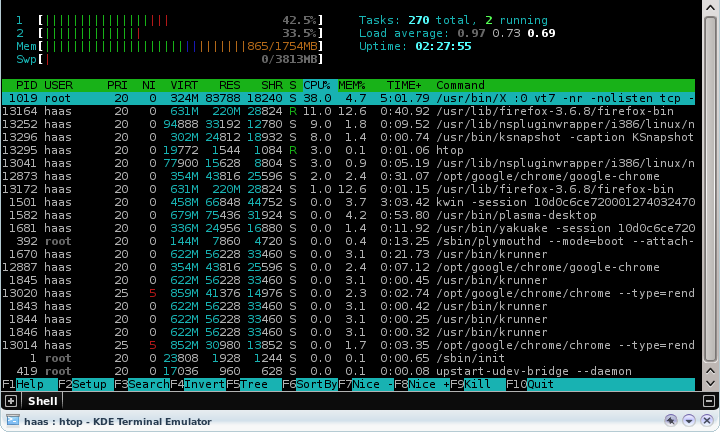
Use htop For Better Memory Usage Details on Linux


htop is a simple and wonderful tool to view the current memory usage on a Linux box. The tool is upgraded version of the top command, providing users some interactive menus and even mouse based control of sorting and menu access.

To install htop on your ubuntu system, execute the following command in a console:
sudo apt-get install htop
Run htop via a console.

Enhanced by Zemanta